SYSTEM REQUIREMENTS
Windows 11 24H2 or later
Requires build 26100 or later. Windows 10 is not supported.
Checking this device…
A temporary space for Windows 11—right at the top of your screen.
Latest Stable · v0.2.1
 DropSpace
3
DropSpace
3
01 / TEMPORARY SPACE
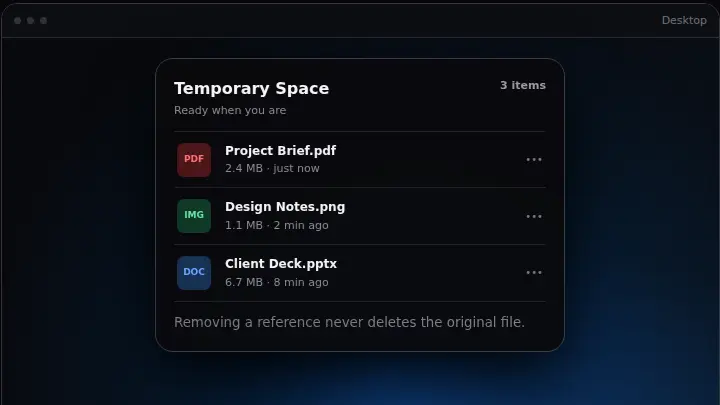
DropSpace keeps file and folder references at your fingertips without moving or duplicating the originals. Your files stay exactly where you left them.
PProject Brief.pdf Today
IDesign Notes.png Today
DClient Deck.pptx Yesterday
02 / TOP-SCREEN ACCESS
The Dynamic Island stays out of the way, then moves fluidly through Compact, Drop Ready, and Expanded as your files need it.
Temporary Space303 / CLIPBOARD HISTORY
Find copied text, links, images, files and folders. Pause recording when you need to, pin what matters, and search everything in one place.
AAA→AABA→ABA04 / DRAG & DROP
Explorer, Desktop, Compact, Expanded, or the main window—DropSpace meets the file where your workflow already is.
PRODUCT PREVIEW
A lightweight product demo based on the shipped v0.1.0 interaction and UI structure. It is a website reconstruction, not a recording from another app.
DOWNLOAD
Latest Stable · v0.2.1
Windows 11 build 26100 or later
View all releases ↗SHA-256 checksums ↗SYSTEM REQUIREMENTS
Requires build 26100 or later. Windows 10 is not supported.
Checking this device…
KNOWN LIMITATIONS
The current public build is unsigned, so SmartScreen may show an unknown-app warning. Windows 11 Drop Tray can own the same top-edge gesture, and Share integration requires a future trusted-signed build.
VERIFY YOUR DOWNLOAD
Download only from the official GitHub Release. Compare the file's SHA-256 with SHA256SUMS.txt; a matching hash proves file integrity, but not publisher identity.
Verification guideOPEN SOURCE
DropSpace is built in the open, with its code, decisions, privacy model and release history available to everyone.
Apache-2.0 · Copyright 2026 Airan Luo
FAQ
A local-first Windows 11 workspace for temporarily holding file references and recent clipboard content, with a main window and a top-center Dynamic Island.
No. Temporary Space stores references. Adding or removing a reference does not move, copy, or delete the original file.
Yes. DropSpace can hold file and folder references through drag and drop or its picker.
A local history of captured text, URLs, images, files, and folders. You can search, pin, pause, clear, and apply retention limits.
The recommended per-user Installer adds Start Menu integration, an uninstaller, and in-place update support. Portable runs directly without installation; updates are notify/download-only.
No. The current release requires Windows 11 build 26100 or later.
Windows may own the same top-edge drag gesture. DropSpace Settings links to the official Multitasking page; direct drops onto visible Compact and Expanded surfaces remain supported.
No. Ordinary content features use local storage. If update checks are enabled, DropSpace contacts only public GitHub Release metadata and official GitHub asset URLs.
Stable receives Stable releases. Preview can receive Stable and Preview releases. DropSpace verifies download size and SHA-256; the current unsigned release requires explicit user action to install.